GPUs are the most expensive resources in your Kubernetes cluster. Scale that to a team of ML engineers, each wanting their own GPU allocation, and you’re burning through budget fast — whether the hardware is being used efficiently or not.
The uncomfortable truth is that most GPU clusters are underutilized. One team claims a full GPU for an inference workload that only needs a fraction of the memory. Another team’s batch job sits in pending because there’s no capacity — even though half the allocated GPUs are idle. The hardware is there. The scheduling isn’t.
This post is about two things: how to share GPUs fairly across teams using Kueue, and how to slice individual GPUs into smaller, isolated pieces using NVIDIA MIG. Together, they let organizations get more out of hardware they’re already paying for.
Why Kubernetes GPU Scheduling Falls Short
Kubernetes handles GPU scheduling the same way it handles any other resource: a pod requests nvidia.com/gpu: 1, the scheduler finds a node with a free GPU, and it assigns it. First come, first served.
This works fine when one team owns one cluster. It breaks down the moment you have multiple teams sharing GPU infrastructure.
Here’s a scenario. You have three ML teams:
- Team A runs model training — long-running jobs that need sustained GPU access.
- Team B runs inference services — latency-sensitive, always-on, but each instance uses a fraction of a GPU.
- Team C runs weekly batch evaluations — bursty workloads that need a lot of capacity for a few hours, then nothing.
Without any scheduling policy, this is what happens:
Team A submits a training job and claims all available GPUs. Team B’s inference service can’t schedule — it’s stuck pending. Team C looks at the queue, gives up, and spins up a separate cluster. Now you have two clusters, double the cost, and both are underutilized.

The obvious answer is Kubernetes ResourceQuotas. Give each team a hard limit: Team A gets 4 GPUs, Team B gets 2, Team C gets 2. Problem solved?
Not really. Hard quotas are rigid. If Team C isn’t running anything this week, their 2 GPUs sit idle. Team A could use that capacity for a larger training run, but the quota system won’t allow it. You’ve traded one problem (unfair access) for another (wasted resources).
What you actually need is:
- Guaranteed quotas — each team gets a minimum they can always count on.
- Borrowing — if another team’s allocation is idle, you can use it temporarily.
- Preemption — when the owner needs their resources back, borrowed workloads get evicted automatically, in a controlled way.
- Prioritization — not all workloads are equal. A production inference service should take precedence over an experimental batch job, and the scheduler should know that.
Kubernetes doesn’t have any of this natively.
Kueue: Job-Level Resource Management for Kubernetes
Kueue is a Kubernetes-native job queuing system built by the Kubernetes community as a SIG project. It doesn’t replace the kube-scheduler. Instead, it sits above it and controls when workloads are allowed to start.
The kube-scheduler decides where a pod runs (which node). Kueue decides whether it should run at all, based on quotas, priorities, and fair sharing policies. A workload doesn’t get pods created until Kueue admits it.
Instead of statically partitioning resources with hard quotas, Kueue dynamically manages admission based on what’s available, what’s guaranteed, and what can be borrowed. To understand how, it helps to see how the pieces fit together first.
The Kueue Model
Kueue’s architecture has five core concepts. They form a hierarchy: teams submit workloads to LocalQueues, which route to ClusterQueues that define resource budgets. ClusterQueues are grouped into a Cohort for sharing. ResourceFlavors describe what types of compute back each queue. And WorkloadPriority determines which jobs survive when resources are contested.
Here’s how each one works:
ClusterQueue — the resource budget for a team or group. This is a cluster-scoped object where an admin defines how many GPUs (and CPU, memory) a pool has access to. Each ClusterQueue has three knobs:
nominalQuota— the guaranteed allocation. This capacity is always available to the queue, regardless of what other teams are doing.borrowingLimit— how much extra capacity this queue can borrow from other queues in the same Cohort when they have idle resources.lendingLimit— how much of this queue’s unused capacity others are allowed to borrow.
These three settings give you precise control over how resources flow. A team can have a generous borrowing limit for experimentation but a tight lending limit to protect their critical workloads.
apiVersion: kueue.x-k8s.io/v1beta1
kind: ClusterQueue
metadata:
  name: team-a-cq
spec:
  cohort: ml-org
  resourceGroups:
    - coveredResources: ["nvidia.com/gpu"]
      flavors:
        - name: h100
          resources:
            - name: "nvidia.com/gpu"
              nominalQuota: 4
              borrowingLimit: 4
              lendingLimit: 2
LocalQueue — the submission point that teams interact with. This is namespace-scoped. A data scientist submits a job to their namespace’s LocalQueue, which routes to the appropriate ClusterQueue. Teams don’t need to know about cluster-level configuration — they just submit jobs.
Cohort — the sharing boundary. A Cohort groups ClusterQueues that can borrow from and lend to each other. Without a Cohort, each ClusterQueue is isolated — it can only use its own nominal quota. Putting queues in a Cohort enables the dynamic sharing that makes this whole model work.
ResourceFlavor — what type of compute backs the quota. This could be a whole GPU, a specific GPU model (A100 vs H100), or a MIG slice. ResourceFlavors map to node labels, so Kueue knows which physical resources correspond to each flavor. This becomes important when we get to MIG — you can have separate flavors for 1g.10gb and 3g.40gb slices on the same hardware.
WorkloadPriority — the tiebreaker. When multiple workloads are competing for the same resources, priority determines who gets admitted first and who gets preempted. Preemption targets borrowed resources first and lower-priority workloads first, so a team’s guaranteed quota running high-priority work is never touched.
apiVersion: kueue.x-k8s.io/v1beta1
kind: WorkloadPriorityClass
metadata:
  name: production
value: 1000
---
apiVersion: kueue.x-k8s.io/v1beta1
kind: WorkloadPriorityClass
metadata:
  name: research
value: 100
---
apiVersion: kueue.x-k8s.io/v1beta1
kind: WorkloadPriorityClass
metadata:
  name: batch
value: 10
A production inference service at priority 1000 won’t get evicted for an experimental notebook job at priority 10.
How It Works in Practice
Let’s go back to our three teams. With Kueue, you’d set up three ClusterQueues in a single Cohort:

Each team gets a LocalQueue in their namespace that routes to their ClusterQueue. The Cohort enables borrowing across all three.
Monday morning. Team C has no batch jobs running. Their 2 GPUs are idle. Team A submits a training job that needs 6 GPUs. Kueue admits it: 4 from Team A’s guaranteed quota, 2 borrowed from Team C’s idle allocation. All 8 GPUs are in use.
Wednesday. Team C’s weekly evaluation kicks off and needs its 2 GPUs back. Kueue looks at what Team A is borrowing and checks priorities. It identifies the lowest-priority workload running on borrowed resources — a speculative evaluation job Team A submitted with batch priority — and preempts it. Team A’s core training job, running on their guaranteed quota with research priority, is untouched. Team C’s batch evaluation gets admitted.
The result: GPUs are never idle when someone needs them. Each team has a guaranteed floor. Borrowing and preemption happen automatically, based on policies you define once. No Slack messages asking people to please free up resources.

GPU Slicing with NVIDIA MIG
So far we’ve been talking about whole GPUs. But here’s the thing: not every workload needs a full GPU.
A modern NVIDIA H100 has 80 GB of VRAM. A small inference model might need 10 GB. Without any form of GPU partitioning, that model claims an entire GPU — and 70 GB of memory goes unused. Multiply that across a cluster and you’re looking at massive waste.
NVIDIA Multi-Instance GPU (MIG) solves this by letting you partition a single physical GPU into multiple isolated instances, each with its own dedicated memory, compute cores (streaming multiprocessors), and cache. MIG requires NVIDIA Ampere architecture or newer — that includes A100, A30, H100, and H200 GPUs.
The key word is isolated. This is different from GPU time-slicing, where multiple workloads share the full GPU by taking turns. With time-slicing, workloads can interfere with each other — a noisy neighbor running a heavy training step can cause latency spikes for your inference service sharing the same GPU. MIG provides hardware-level isolation. Each slice is essentially an independent GPU with its own memory space. One workload can’t see or affect another.
MIG Profiles
Each GPU model supports specific partition configurations called profiles. The table below shows profiles for the 80 GB H100 SXM variant (used in ND H100 v5 VMs). Other variants like the NC H100 v5 (94 GB NVL) have different slice sizes.
| Profile | Memory | Compute | Slices per GPU |
|---|---|---|---|
| 1g.10gb | 10 GB | 1/7 SMs | 7 |
| 2g.20gb | 20 GB | 2/7 SMs | 3 |
| 3g.40gb | 40 GB | 3/7 SMs | 2 |
| 7g.80gb | 80 GB | 7/7 SMs | 1 (full GPU) |
With the 1g.10gb profile, one physical H100 becomes 7 independent GPU instances. On an Azure ND H100 v5 VM — which has 8 GPUs per node — that’s 56 MIG slices from a single virtual machine.
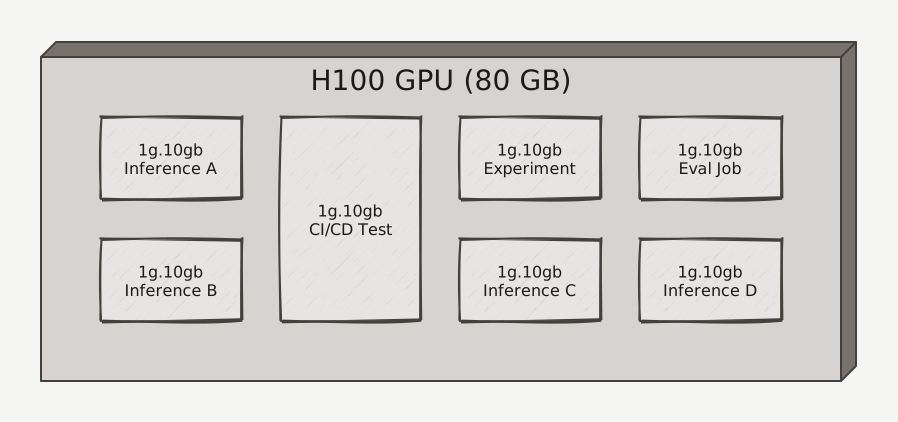
Different profiles fit different workloads:
- Small inference models, CI/CD tests, experimentation →
1g.10gbslices give each workload enough memory for lightweight tasks without wasting a full GPU. - Medium inference, model evaluation →
2g.20gbor3g.40gbfor workloads that need more memory but still don’t justify a whole GPU. - Large-scale training, big model inference →
7g.80gbgives you the full GPU when you need all of it. Running larger LLMs in most cases would require multi-GPU setups.
Changing MIG profiles on a node isn’t a hot swap — the GPU Operator drains the node, reconfigures the GPUs, and pods reschedule. Plan profile changes during maintenance windows or on nodes that can tolerate disruption.
MIG Meets Kueue
This is where the two concepts reinforce each other, and the efficiency gains compound.
Without MIG, Kueue manages quotas at the whole-GPU level. A team requesting one GPU for a small inference model wastes most of that GPU’s capacity — Kueue can ensure they get fair access, but it can’t prevent the underlying waste. With MIG, the granularity changes entirely.
In Kueue, each MIG profile becomes a separate ResourceFlavor. Instead of teams requesting a generic nvidia.com/gpu, they request exactly the slice size their workload needs:
resources:
  limits:
    nvidia.com/mig-1g.10gb: 1  # Just a slice, not a whole GPU
This means Kueue’s quotas and fair sharing now operate at the slice level. An admin can set up a ClusterQueue like:
nominalQuota:
  - name: mig-1g-10gb
    nominalQuota: 14    # 2 full GPUs worth of small slices
  - name: mig-3g-40gb
    nominalQuota: 4     # 2 full GPUs worth of medium slices
  - name: full-gpu
    nominalQuota: 4     # 4 whole GPUs for training
Now Team B’s inference services run on 1g.10gb slices — 7 instances per GPU instead of one. Team A’s training jobs still get full GPUs. Both run on the same physical hardware, both get fair scheduling through the same Cohort, and the utilization story changes from “most of the memory is wasted” to “every slice is allocated where it’s needed.”
The borrowing and preemption model works across flavors too. If Team A’s full-GPU quota is exhausted, they can borrow idle MIG slices for smaller evaluation jobs. When those slices are needed back, preemption handles it the same way — based on priority and borrowing status.
Putting It All Together
The reason I built this sample was to show how these pieces work as a system, not just individually.

The cluster has two layers. The infrastructure layer has two node pools: a system pool running Kueue’s admission controller and the NVIDIA GPU Operator, and a GPU pool with ND H100 v5 nodes (8× H100 GPUs each). The scheduling layer is where Kueue sits — LocalQueues in each team’s namespace submit to ClusterQueues grouped in a Cohort. Kueue admits workloads from the scheduling layer onto GPU nodes in the infrastructure layer. The GPU Operator manages drivers and MIG configuration on those nodes independently.
The sample deploys the full stack using Azure Developer CLI (azd) — the AKS cluster, GPU node pool, Kueue configuration with ClusterQueues and Cohorts, and example workloads. But the more interesting part is the interactive walkthrough.
The walkthrough script runs you through the complete lifecycle: submitting jobs from different teams, watching Kueue admit them against quotas, observing borrowing when capacity is idle, and triggering preemption when a higher-priority team needs resources back. Each step pauses so you can inspect the cluster state — kubectl get workloads, queue status, pod scheduling — and see exactly what Kueue is doing under the hood.
MIG is configurable at deploy time. You can choose between full GPUs or any of the MIG profiles. Switching profiles on a running cluster is a single kubectl label command — the GPU Operator handles the reconfiguration automatically.
Why This Matters
The economics of GPU infrastructure are forcing a shift. When a single ND H100 v5 VM costs more per hour than most teams’ daily cloud budgets, the “one team, one cluster” model doesn’t scale. Organizations are moving toward shared GPU platforms — and that’s where the real challenges start.
Fair sharing across hundreds of ML engineers and dozens of teams isn’t something you solve with a spreadsheet and some Kubernetes ResourceQuotas. You need a system that understands priorities, can dynamically redistribute idle capacity, and handles contention automatically. That’s the scheduling layer. And when those same teams are running workloads that range from multi-node distributed training across hundreds of GPUs to small inference services that need a fraction of one, you also need the hardware to be divisible. That’s the GPU slicing layer.
Kueue handles the first problem. It gives platform teams a way to define fair sharing policies that actually work at scale — guaranteed quotas so teams can plan, borrowing so nothing sits idle, preemption so the right workloads get priority, and Cohorts so the sharing boundaries match the organizational structure. At the scale of hundreds of nodes, this isn’t a nice-to-have. It’s the difference between a GPU platform that teams trust and one they route around.
MIG handles the second problem. Hardware-level isolation means you can pack multiple workloads onto a single GPU without the noisy-neighbor issues of time-slicing. A single 8-GPU node can serve training jobs on full GPUs and dozens of inference services on slices simultaneously. Across a fleet of nodes, that’s a dramatic improvement in utilization.
Together, they let you build GPU infrastructure that scales with the organization — not just in raw capacity, but in how efficiently that capacity is shared. The alternative is what most organizations end up with today: underutilized clusters, shadow infrastructure, and a lot of wasted spend.
The sample is here if you want to try it: Azure-Samples/aks-kueue-sample.
📝 A note on costs: The GPU VMs used in this sample are expensive. Make sure to tear down your resources when you’re done exploring —
azd down --force --purgewill clean everything up.
Further Reading
- Kueue Documentation — full reference for concepts, configuration, and supported workload types.
- NVIDIA MIG User Guide — profile tables, supported combinations, and operational details.
- Deploying ND H100 v5 with MIG on AKS — step-by-step guide for AKS + MIG setup.
- AKS GPU Best Practices — Azure-specific guidance for running GPU workloads.
- NVIDIA GPU Operator on AKS — driver management, device plugin, and MIG configuration.